Blog
GEO: are you missing from AI answers? 5 steps that work for a new site
In its first month, FacialRate’s curves in Google Search and in AI search both went up. Has your site been live for months, still flat, and missing every time someone asks an AI about your trade? GEO and SEO are one craft: make search engines and AI understand you first, then get them to index and rank your site.
Step 1: How to start SEO on a new site? One address per page
How do you start SEO on a new site? Give every page exactly one address, so a search engine never mistakes one page for several.
FacialRate is our own product. In its first days, Search Console showed two addresses from the product app itself, dragging our own tracking parameters behind them. Pages like that are useless to a searcher, and they compete with the pages written to be found.
We did 4 things:
- One host for the whole site, with www; the other one redirects to it.
- A version of each page in every language, each pointing to the others with hreflang.
- A sitemap that lists only the pages we want found.
- The app is noindex from end to end, so searchers land only on pages written to be read.
Around day 3 after launch, impressions started to appear. With the foundations in place, search engines could index the site. But why would they show it to anyone?
Step 2: One question, one page
Because of the content: for every question people search, there is one page that answers it, and each page goes after one phrase only.
We built a guide around what people type when they search about faces: face shapes, proportions, features, photos, skin and style. Each topic is a cluster: an overview, one article per question, and links between them by their own names.
When we were unsure anyone searched for a topic, we first published a single article in one language as a probe, and rolled it out to every language once it drew impressions.
Answer on the page exactly what people ask in the search box.
In 3 moves:
- List the questions people ask, one page per question.
- Aim each page at one phrase. It goes in the title, the description, the heading and the text.
- Let automated checks hold the rule: if two pages chase the same phrase, the change does not merge.
Once impressions grew, the next problem showed up: seen, but not clicked.
Step 3: Impressions but no clicks? Fix the title
Impressions without clicks almost always point at the title and description: they miss the searcher’s own words, and they do not say what the click gets you.
Search Console showed pages already on page one with zero clicks. One was our article on hairstyles for long faces. Its old title listed what it covered: bangs, volume at the sides, length. All correct. Nothing in it told a reader why to click. The new one asks the reader’s question, then promises 3 ways to make the face look shorter, with a list of what to avoid.
Pages earn the impression. Titles earn the click.
We rewrote the whole guide to one format, with 4 rules:
- First half: the question the reader searched, in their words.
- Second half: what the page gives them, with a count when there is one.
- A script checks the length. Within a language, no two may look alike.
- The sitemap date is the moment the page really changed.
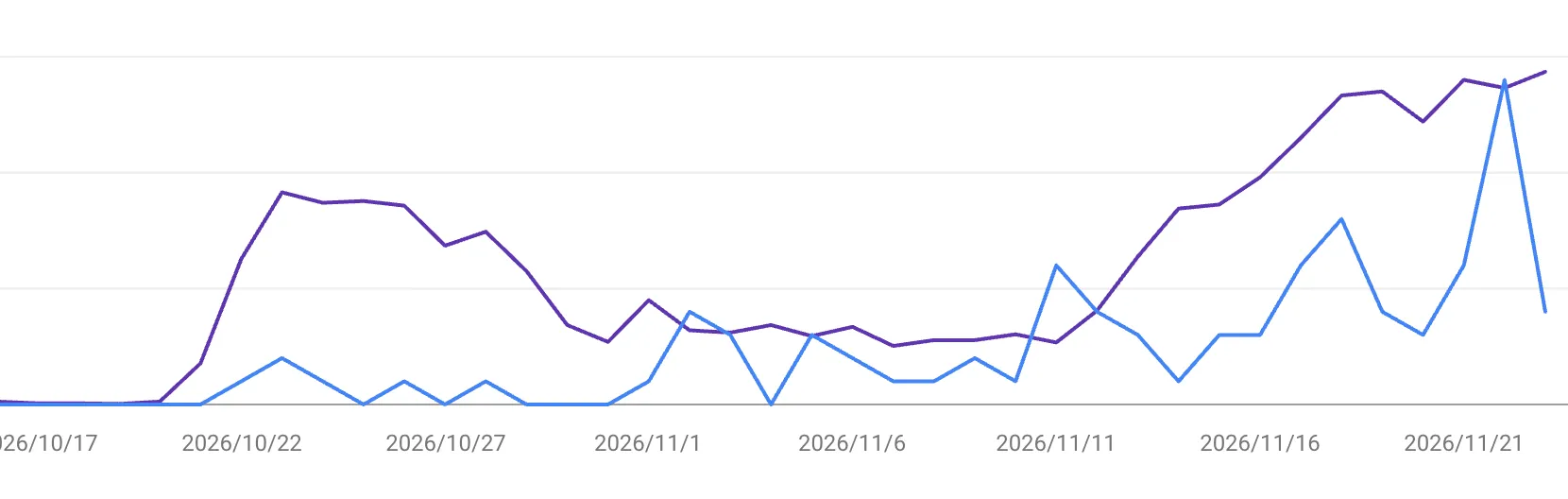
In the second half of the month, after the rewrite, impressions climbed steadily and clicks followed, with their best day near the end. The latest day in Search Console is often still incomplete.
Step 4: For GEO, open the door to AI first
To be quoted by AI search, let AI crawlers in first, then hand them a description they cannot misread.
Many robots.txt files were written years ago and never mention an AI crawler by name. In FacialRate’s robots.txt we named 12 of them, across AI search, AI assistants and AI training, and allowed them all. Content Signals, a policy proposed by Cloudflare, then say yes to all three uses: search, quotes in AI answers, and training.
How to write an llms.txt? It is a proposal by Jeremy Howard of Answer.AI: a plain-text file at the site’s root, written for AI to read. It is still a proposal, and no AI company has publicly committed to reading it, so we treat it as a cheap extra.
How we write ours:
- The first paragraph says what the product is and who it is for.
- Then the key facts, including the claims it does not make.
- Facts only, with no instructions for the model.
Our first version told the model how to phrase things. We deleted every line of that.
Step 5: GEO runs on consistent facts
The last step of GEO is saying each fact the same way everywhere, so an AI can quote it with confidence.
We made 3 things consistent:
- Guide articles answer their question in the first paragraph, which can be quoted on its own.
- The site, llms.txt and the app describe what the product measures, and what it does not claim, in the same words, copied from the product.
- Structured data names the product and its publisher the same way on every page, alternate names included, and the brand appears in the page’s own text.
Make AI understand you first. Then it can quote you right.
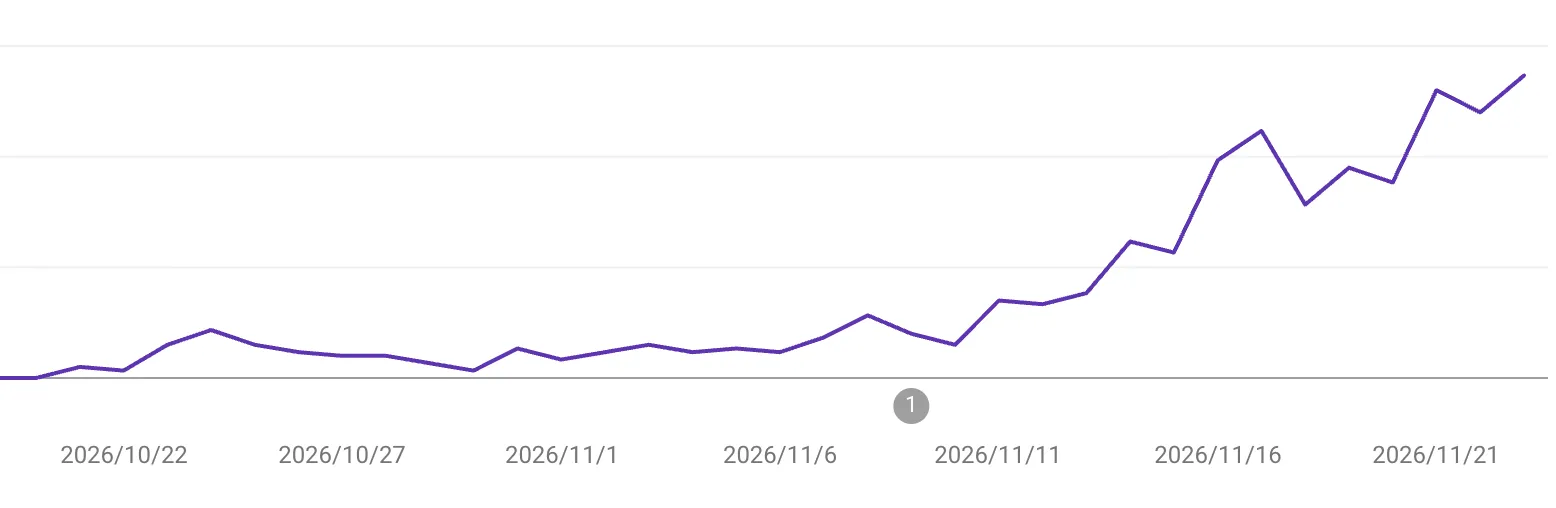
Visibility in AI search started slowly, picked up clearly in the second half of the month, and kept rising to the latest day. A curve cannot show which step mattered most. It shows that the 5 together point the right way.
One thing you can do today
None of this takes a large team. It takes reading the data every week and changing pages because of it. Today, open Search Console, find 3 pages with impressions but few clicks, and rewrite each title as the searcher’s own words plus what the click gets them.
To put these 5 steps to work on your site, see our SEO and GEO service, read the FacialRate case, or write to hi@nocboard.com with your address and the question you most want to be found for.
Questions
What is GEO?
GEO, generative engine optimization, is the work of getting your content understood and quoted by AI search such as ChatGPT, Perplexity and Doubao: letting AI crawlers in, publishing an llms.txt, answering first, and keeping facts consistent.
How is GEO different from SEO?
SEO gets you ranked in search results; GEO gets you mentioned in AI answers. They share a foundation: pages that can be crawled, one question per page, and clear, consistent facts. We did both together for FacialRate.
How soon does a new site show up in search?
It depends on the site. FacialRate had impressions in Search Console around day 3 after launch, and the steady climb came in the second half of the month. The data takes a few days to complete, so trends are more reliable than single days.
What to do about impressions without clicks?
Look at the queries that page gets in Search Console, rewrite the title as the searcher’s words plus what the click gets them, and make the description say what the page answers.